

The secret to an organized family isn’t a better calendar—it’s designing a visual system that outsources your brain’s work and reduces cognitive load for everyone.
- Digital tools are essential for syncing data across devices, but analog systems provide crucial at-a-glance clarity in high-traffic home areas.
- The most effective systems are those that are so visually intuitive, even a non-reading child can understand and help maintain them.
Recommendation: Start by creating a central ‘Command Center’ and implementing a weekly ‘Sunday Reset’ to build sustainable organizational momentum.
The frantic text from another parent: “It’s mufti day, by the way!” The sinking feeling as you realize the dentist appointment you just remembered clashes with a work trip you forgot to add to the shared calendar. For any parent, this is the familiar hum of chaos. The mental list of dates, deadlines, and duties is a significant source of stress, a constant cognitive load that never seems to lighten. You’ve likely been told to “get a planner” or “just use Google Calendar,” but these tools often feel like temporary patches on a systemic problem.
The common advice treats the symptom, not the cause. The issue isn’t a lack of tools; it’s the lack of an integrated *system*. A professional organizer knows that true efficiency doesn’t come from a single app or a pretty whiteboard. It comes from intentionally designing workflows that make important information visible, accessible, and easy to maintain for every member of the family, regardless of their age. The goal is to make consistency the path of least resistance.
But what if the key wasn’t about finding the perfect solution, but about building a hybrid system that leverages the best of both analog and digital worlds? This guide moves beyond simple tips to provide a strategic framework for family organization. We will deconstruct the core components of a successful family planner system, from the foundational psychology of color-coding to the practical design of kid-proof routines. It’s time to stop managing chaos and start designing clarity.
This article will guide you through the essential strategies for creating a comprehensive family organization system that truly works. Below is a summary of the key areas we will cover to help you build a more streamlined and less stressful home life.
Summary: The Ultimate Family Planner System: Analog vs Digital Solutions
- Color Coding: Assigning a Color to Each Family Member for Clarity
- The Command Center: Setting Up a Hallway Hub for Keys, Mail, and Dates
- Cozi vs Google Calendar: Which App is Best for Family Management?
- The Sunday Reset: Planning the Week Ahead to Reduce Morning Stress
- Kids’ Visual Charts: Helping Non-Readers Know What’s Happening Today
- Digital Calendars: Using Apps to Sync School Dates and Work Trips
- The Night Before Rule: Laying Out Uniforms to Save Morning Panic
- Maintaining Home Organization: Systems That Kids Can Actually Maintain
Color Coding: Assigning a Color to Each Family Member for Clarity
The simplest systems are often the most powerful. Color coding is a prime example, acting as a foundational layer for any family organization strategy. Its effectiveness isn’t just aesthetic; it’s rooted in cognitive science. By assigning a distinct color to each family member—blue for you, green for your partner, yellow for your oldest, orange for your youngest—you create a visual shortcut that your brain can process far more quickly than text. This dramatically reduces the cognitive load required to understand a crowded calendar or a set of school folders.
Implementing this system is straightforward. Start with highlighters for your paper planner, different colored pens for your command center whiteboard, or dedicated calendar colors in your digital app. The key is consistency across all your planning tools. When “yellow” is universally understood to mean “oldest child’s activities,” a quick glance is all that’s needed to see if they have soccer practice or a doctor’s appointment. As time management expert Tarek Khatib notes, this creates a powerful mental shortcut.
The human brain is wired to recognize and process colors quickly. By associating specific colors with certain items or ideas, you create a mental shortcut that helps you remember and differentiate between different pieces of information.
– Tarek Khatib, Color Coding in Time Management
This simple act of color-coding does more than just organize dates; it changes how you perceive your schedule. In fact, some research shows that color-coded planning systems can lead to a 31% improvement in the perception of work-life balance. It transforms a wall of text into an instantly scannable, patterned map of your family’s life, allowing you to spot conflicts and commitments with ease.
Ultimately, color coding isn’t just about making things look organized; it’s about making your system function with less mental effort, which is the first step toward reclaiming your time and attention.
The Command Center: Setting Up a Hallway Hub for Keys, Mail, and Dates
A “Command Center” is the physical heart of your family’s organizational system. It’s a designated, high-traffic space—typically in a hallway, entryway, or kitchen—that serves as the single source of analog truth for your family’s daily operations. Its purpose is to stop the endless questions of “Where are my keys?” or “What’s for dinner?” by making critical information visible and accessible to everyone. A disorganized entryway is a symptom of a systemic failure; a command center is the systemic solution.
A successful command center isn’t just a cluttered bulletin board. As a professional organizer, I advise clients to think of it in two distinct zones: the Action Zone and the Information Zone. The Action Zone is for things that are coming in or going out of the house: hooks for keys and backpacks, a tray for incoming mail, and a basket for items that need to be returned. The Information Zone is for reference: a large monthly calendar, the weekly meal plan, and important reminders.
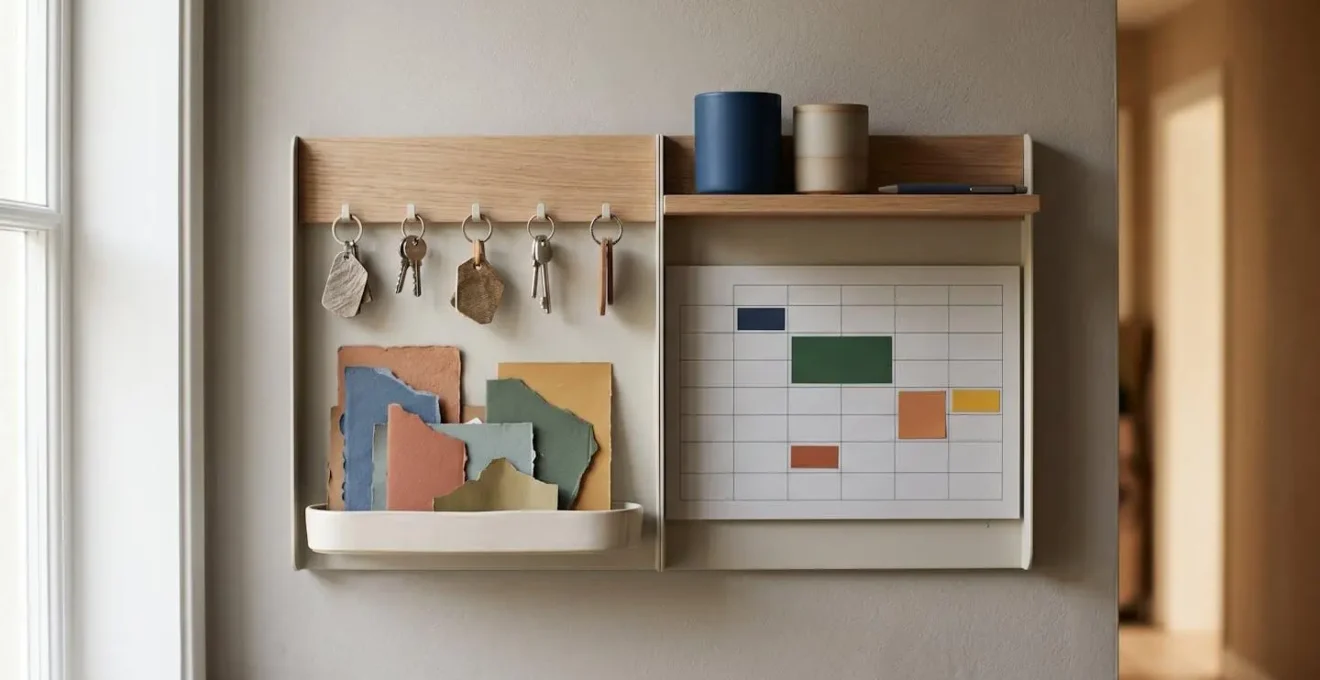
As the image above illustrates, separating these functions prevents the space from becoming overwhelming. The action items are kept distinct from the reference information, allowing for quick, targeted interactions. You don’t have to sift through school art projects to find the car keys. This visual and functional clarity is the hallmark of a well-designed system. It provides an at-a-glance dashboard for your family life, reducing the need to hold everything in your head.
By establishing this central hub, you create a physical anchor for your family’s routines. It becomes the default location for crucial items and information, building a habit of organization that reduces last-minute panic and empowers every family member to be more self-sufficient.
Cozi vs Google Calendar: Which App is Best for Family Management?
While an analog command center provides at-a-glance clarity, a digital calendar is non-negotiable for syncing schedules in a modern family. The two most common contenders are the ubiquitous Google Calendar and the family-focused Cozi. Choosing between them isn’t about which is “better” overall, but which is better designed for the specific job of managing family life. Google Calendar is a powerful, flexible tool, but it’s a blank slate. Cozi, by contrast, is a purpose-built application with family-centric features baked in from the start.
The core difference lies in their fundamental design. Google Calendar treats every event equally. To color-code by family member, you must manually create and manage separate calendars for each person—a cumbersome setup. Cozi has this functionality built-in, automatically assigning a color to each family member you add. Cozi also includes integrated features that families need, like shared shopping lists, a meal planner, and a recipe box, all within one app. Google Calendar requires you to use separate apps (like Google Keep or Tasks) to achieve the same result. The following table highlights some key differences.
A direct comparison of their features reveals how their design philosophies diverge.
| Feature | Cozi | Google Calendar |
|---|---|---|
| Cost | Free (30-day limit) / Gold $40/year / Max $60/year | Completely free, no limits |
| Color-coding by family member | Built-in and automatic | Requires creating separate calendars manually |
| Google Calendar sync | One-way (read-only) | Native (full two-way) |
| Shopping lists | Yes, integrated | No built-in feature |
| Family-specific interface | Designed for families | Not designed for families, no family member concept |
| Cross-platform compatibility | Good, but dated design | Excellent (iPhone, Android, web, integrations) |
| Data privacy approach | Does not use data for advertising | Google data policies apply |
However, it’s crucial to consider the business model. Google Calendar is free because you are the product; your data informs Google’s broader ecosystem. Cozi’s model has become more aggressive. In a controversial move in May 2024, Cozi severely restricted its free plan, limiting users to only 30 days of calendar access and pushing them toward paid tiers. This caused a significant backlash from long-time users who suddenly lost access to years of family data, highlighting the risk of building your system on a platform that can change its rules overnight.
The best choice depends on your priority. If you want an all-in-one, out-of-the-box solution designed specifically for family workflows and are willing to pay for it, Cozi is a strong contender. If you prefer a free, infinitely flexible system and don’t mind a bit of manual setup, a well-configured Google Calendar remains the most powerful and integration-friendly option.
The Sunday Reset: Planning the Week Ahead to Reduce Morning Stress
The most organized families aren’t just reacting to the day; they are proactively shaping the week. The “Sunday Reset” is a cornerstone ritual for this proactive approach. It’s a protected block of time—as little as 30 minutes—set aside every Sunday to review, plan, and prepare for the upcoming week. This isn’t about creating a rigid, hour-by-hour schedule. It’s about reducing future decision fatigue and lowering the collective cognitive load for the entire family. By front-loading the planning, you free up mental bandwidth during the hectic weekday mornings.
A typical Sunday Reset involves several key actions. First, a “brain dump” where you and your partner list out all known appointments, deadlines, and important tasks for the week. Second, you sync this information with your shared digital calendar and the physical command center calendar. This is the moment you catch that the school bake sale is on the same day as a major work presentation. Third, you plan the week’s meals, which informs the grocery list. Finally, you look at the immediate “next day” and prepare for Monday morning—checking if gym kits are packed and permission slips are signed.
This routine can feel like another chore at first, but its benefits quickly become apparent, transforming from a task into a calming, centering habit. The feeling of control it provides can significantly reduce ambient anxiety about the week ahead.
Taking time each week to prepare for the week ahead has helped me to manage my anxiety and stress so much better. It can also help you get back on track after an extra busy or difficult week. The time I take on Sundays to do a weekly reset has become a consistent habit that I now look forward to each week.
– Donna, heydonna.com
By investing a small amount of time on Sunday, you are essentially pre-solving dozens of small problems that would otherwise pop up during the week. You’re creating a roadmap that allows your family to navigate the week with more confidence and less last-minute scrambling.
The Sunday Reset is more than a planning session; it’s a strategic investment in a smoother, calmer week for everyone. It’s the moment you shift from being a passenger in your chaotic schedule to being the pilot of your family’s time.
Kids’ Visual Charts: Helping Non-Readers Know What’s Happening Today
A key principle of successful family organization is empowering every member to be self-sufficient, and this is especially true for children. For pre-readers or young children, abstract concepts like “tomorrow” or “after lunch” are difficult to grasp. A visual schedule chart is a transformative tool that translates the abstract concept of time into a concrete, linear sequence they can see and understand. It answers the constant “What are we doing next?” and reduces anxiety by providing predictability.
A visual chart is simply a series of pictures or icons representing the main activities of the day, arranged in chronological order. For example, a morning routine could be represented by icons for: wake up, get dressed, eat breakfast, brush teeth, put on shoes, go to school. The child can see what they’ve completed and what comes next. This isn’t about rigid control; it’s about providing a clear, supportive structure. The research confirms that visual structure offers a significant improvement in task completion and reduces off-task behavior, especially for children who struggle with executive function.

The power of this system, as shown in the image, is its independence from literacy. Using simple, clear icons allows the child to “read” their day without adult help. This builds a sense of autonomy and competence. Instead of you needing to verbally prompt them through every step of the morning routine, you can simply ask, “What’s next on your chart?” This shifts the dynamic from nagging to coaching, turning a potential point of conflict into an opportunity for independence.
By implementing a visual schedule, you are not just organizing your child’s day. You are giving them a critical tool for self-regulation, reducing their anxiety, and freeing up your own mental energy from having to be the constant director of their activities.
Digital Calendars: Using Apps to Sync School Dates and Work Trips
In a world of overlapping commitments, a shared digital calendar is the backbone of any modern family’s organizational system. It serves as the definitive single source of truth for everyone’s schedule, accessible from anywhere. The era of relying on a single kitchen calendar is over; today’s challenge is to seamlessly sync school district calendars, sports team schedules, work trips, and personal appointments into one coherent view. The adoption of these tools is widespread, with recent data showing that 75% of primary family coordinators aged 35-44 use digital calendars.
However, simply *using* a digital calendar isn’t enough. The goal is to design a system that works automatically, minimizing manual entry and the risk of human error. This means moving beyond just creating individual events. A well-designed system will automatically pull in external schedules. Many school districts and sports clubs (using platforms like TeamSnap) offer calendar feeds that you can subscribe to. With one click, every game, practice, and half-day is automatically populated and updated in your calendar.
Creating this single source of truth requires a clear set of rules and a thoughtful setup process. It’s not just about adding events, but about how you add them and what information you include. A consistent system ensures that the calendar remains a reliable and useful tool for everyone.
- Designate a Primary Calendar: Choose one shared family calendar (on Google, Apple, or Outlook) that will be the master calendar. All family-wide events go here.
- Automate External Syncs: Actively seek out and subscribe to calendar feeds for school districts, public holidays, and sports teams. This is a “set it and forget it” task that saves hours of manual entry.
- Establish Rules of Engagement: Decide as a family on a consistent naming convention for events (e.g., “[Child’s Name] – [Event]”). Clarify who has permission to add or edit events to avoid confusion.
- Block for Travel Time: Don’t just schedule the appointment; create a separate event block for the travel time to and from it. This gives a much more realistic view of your actual availability.
By investing the time to set up these automations and rules, you transform your digital calendar from a simple list of appointments into a dynamic, self-updating dashboard for your family’s life, significantly reducing the mental effort required to stay on top of it all.
The Night Before Rule: Laying Out Uniforms to Save Morning Panic
Morning panic is almost always a result of decisions deferred. The “Night Before Rule” is a simple but profoundly effective system designed to eliminate as many morning decisions as possible. The core principle is this: never leave for the morning what can be prepared the night before. This applies to laying out school uniforms, packing lunches, and setting out backpacks. By creating a “launch pad” area near the door, you create a physical system for a smooth morning departure.
This isn’t just about saving time; it’s about conserving precious mental energy. In the morning, with everyone rushing and cognitive resources low, even a small decision like “which socks should I wear?” can become a point of friction. By making these choices in the calm of the evening, you remove potential roadblocks. Laying out a complete outfit—from uniform and socks to shoes—eliminates an entire category of morning negotiation and searching. This small act of preparation is a gift to your future, less-caffeinated self.

The “launch pad” is the physical manifestation of this rule. It’s an area where everything needed for the next day is gathered, packed, and ready to go. As the detailed image shows, the backpack is zipped, the lunchbox is on the bench beside it, and the folded clothes are waiting. This visual checklist provides a final confirmation that you are truly ready for the morning. It’s the last stop in your evening’s “closing shift” and the first step toward a calm, orderly start to the next day.
By adopting this rule, you’re not just organizing items; you are systematically dismantling the sources of morning stress. You are designing a routine that replaces panic with predictability and ensures your family can launch into their day with calm and confidence.
Key Takeaways
- A ‘Command Center’ is non-negotiable; it provides a physical, at-a-glance dashboard that digital tools cannot replace.
- Digital calendars are best for syncing data and appointments, while family-specific apps (like Cozi) are designed to manage family-centric workflows like shopping lists and meal plans.
- The most effective and sustainable organizational systems are visual and simple enough for even the youngest, non-reading child to understand and help maintain.
Maintaining Home Organization: Systems That Kids Can Actually Maintain
The ultimate goal of any home organization system is not just to get organized, but to *stay* organized. This is where most efforts fail. A system that requires constant adult intervention is not a system; it’s a temporary fix. True sustainability comes from designing systems that are so intuitive and simple that even children can—and will—help maintain them. The key is to design for the user, and in a family, your youngest members are your most demanding users.
As a professional, I advise parents to get down on their knees—literally—to see the world from a child’s height. Are labels readable? Are shelves reachable? Are lids too heavy or complicated? A system is only as good as its weakest link. For instance, using deep, lidded boxes for toy storage creates three points of failure: the child can’t see what’s inside, they can’t easily open the lid, and they are unlikely to be able to put it back on. Swapping them for open, color-coded bins at waist height instantly removes these barriers. This is the essence of frictionless maintenance.
Creating routine together gives kids a sense of stability—and it doesn’t all fall on your shoulders. Even young children can help with small tasks like putting shoes by the door, choosing between two outfits, or carrying items to a basket with support.
– Simplicity Home Living, The Sunday Reset: A Weekly Routine That Helps Parents Feel More in Control
Involving children in the maintenance of these systems isn’t just about outsourcing your work; it’s about teaching them responsibility and ownership. The “5-Minute Closing Shift” is a powerful routine to instill: before bed, a timer is set, and everyone works together to return items to their designated “homes.” It’s not about achieving perfection, but about practicing the habit. This turns tidying from a monumental task into a small, manageable, and shared daily ritual.
Your Checklist for Kid-Proof Systems
- Use open bins and containers instead of lidded boxes – kids can see contents and access them without extra steps.
- Label storage with both pictures and words, positioned at the child’s eye level for independent identification.
- Ensure accessible heights: storage should be reachable without adult help (typically waist-height or lower for young children).
- Create visual ‘zones’ using color coding: one color bin per child or one color per category of items.
- Implement a nightly 5-minute ‘closing shift’ routine where everyone returns items to their designated ‘home’ before bedtime.
Stop creating beautiful systems that only you can maintain. Start designing simple, visual, and accessible systems that empower your children to become active participants in your family’s organization. That is the secret to a home that doesn’t just get tidy, but stays tidy.